
Introduction
What Are Expected Results in a Bug Report?
Expected results describe what the software SHOULD do when working correctly. They answer the question: "What did you expect to happen?"
- Specific - not "it should work"
- Measurable - include numbers, states, or outcomes
- Based on requirements - reference user stories or specs
- Verifiable - a developer can confirm the fix works
Bug Report Expected Results: Vague vs Clear
| Vague (Avoid) | Clear (Use This) |
|---|---|
| "Login should work" | "After entering valid credentials, user should be redirected to /dashboard within 2 seconds" |
| "Error message should appear" | "Red error banner with text 'Invalid password' should display below password field" |
| "Page should load faster" | "Page load time should be under 3 seconds on 4G connection" |
Bug Report Template: Expected Results Section
[Action] should [produce outcome] [with specific details]
Clicking "Submit Order" should:
1. Display confirmation modal with order number
2. Send confirmation email within 60 seconds
3. Redirect to /order-confirmation/[order-id]
4. Deduct purchased items from inventory
Bug Report Expected Results by Tool
Expected Result: User with email [email protected] and password "ValidPass123" should successfully log in and see the dashboard at /app/dashboard
Actual Result: Login spinner runs indefinitely, no redirect occurs
When clicking the "Export CSV" button with 1000+ records selected, the download should:
- Start within 5 seconds
- Complete within 30 seconds
- Produce a valid CSV with all 1000 records
## Actual Behavior
Download starts but file is corrupted (0 bytes)
Actual: Returns 500 Internal Server Error after 30 second timeout
Writing Expected Results: 4-Step Process
State the Action
Describe what triggers the expected behavior
Describe Outcome
Write what SHOULD happen when working correctly
Add Measurable Criteria
Include specific numbers, timeframes, or states
Reference Requirements
Link to user story or spec that defines expected behavior
A successful bug report does more than just tell the developer what went wrong; it highlights the difference between what was supposed to happen and what actually happened. As a tester, it’s your job to get this right, ensuring that the report is clear and informative, which makes the whole process smoother for the development team.
When writing a bug report, there are two key components: actual results and expected results. The actual results are what you observed during the test, regardless of what the software was intended to do at that point in development.
The expected results, on the other hand, represent how the item should behave according to the specifications or requirements. This is the “ideal scenario” that the developer and tester agree on when running tests. While your actual results come from your direct observations, the expected results rely heavily on the documentation you can access.
So, what happens when you’re missing some of that critical documentation? Let’s look at two key situations and how to handle them.
Situation 1: you do not have requirements or specifications
Looking for a QA partner who builds their own tools?
BetterQA’s 50+ engineers use 5 proprietary AI tools — included free with every engagement. No tool licensing fees, no reselling.
We’ve all been there; testing a feature with little or no documentation to guide you. When this happens, your bug report needs to rely on your observations and your understanding of the ideal scenario.
Here’s where you need to get detailed and clear. You can’t afford vague statements like “The captions should load, but they don’t.” You need to be specific about what the expected result is, even if you don’t have a formal spec to back it up.
Let’s break this down into two possible scenarios you might face:
1.1 What you are presenting is just an improvement of an existing process. This time, it's best to use the word "could":
If the issue you’re reporting is more about improving an existing process (rather than something broken), you can use the word “could” in your expected results. This frames the change as a suggestion or improvement.
For example:
-
Actual result: The app makes it easy for users to accept cookies, but rejecting them is hard.
-
Expected result: The app could make rejecting cookies as easy as accepting them.
The wording here shows you’re suggesting a better experience without saying it’s absolutely broken.
See more: It’s easy to accept all cookies, but how difficult is it to reject all of them?
1.2 The bug behavior is based on industry standards. This time, you need to use "should":
On the other hand, if the bug behavior contradicts industry standards, use “should” in your expected results. This implies that the behavior doesn’t meet the general expectations for how things should function.
For example:
-
Actual result: You can log in as a regular user in the admin section of the product.
-
Expected result: You should not be able to log in with a regular user account to the admin section of the app.
In this case, “should” indicates that the app isn’t meeting basic functionality standards, and it helps the developer understand that this is a more serious issue.
Situation 2: you do have requirements or specifications
If you’re lucky enough to have full access to requirements and specifications, you have a solid foundation for writing your bug report. In this case, the expected results are already documented, so your job is just to compare the actual results with what’s in the documentation.
When you have the proper documentation, your bug report should reference it directly. This can save the development team tons of time by clarifying exactly where things went wrong.
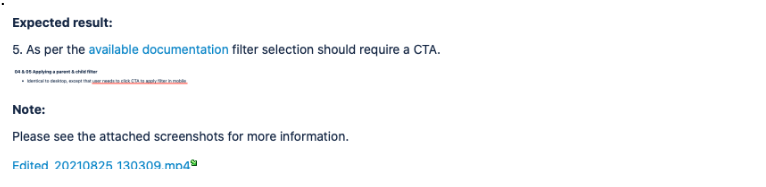
1.3 In this situation, the bug report template involves presenting a link to the existing documentation followed by a screenshot, as shown in the examples below:
1.

2.

3.
Bug Reports as a Communication Tool
In the end, bug reports aren’t just about identifying issues, they’re a primary means of communication between testers and developers. Writing clear, well-structured bug reports can make a huge difference in how smoothly the development process goes.
By embracing standardized bug report templates and industry-recognized formats, you streamline the process, making it easier for everyone involved. This consistency creates a more efficient, informed, and collaborative development environment. And when teams work together in harmony, the software development lifecycle becomes more robust, reliable, and effective.
Stay Updated with the Latest in QA
The world of software testing and quality assurance is ever-evolving. To stay abreast of the latest methodologies, tools, and best practices, bookmark our blog. We’re committed to providing in-depth insights, expert opinions, and trend analysis that can help you refine your software quality processes.
Delve deeper into a range of specialized services we offer, tailored to meet the diverse needs of modern businesses. As well, hear what our clients have to say about us on Clutch!
Tired of writing bug reports from scratch?
Our QA engineers have written 50,000+ bug reports. We built tools to make it faster - and we can help your team do the same.
Frequently Asked Questions
Q: What should expected results include in a bug report?
A: Expected results should include the exact behavior, data state, or UI change that should occur based on requirements or specifications. Be specific enough that any engineer can verify pass/fail without asking clarifying questions.
Q: How do I write expected results without documentation?
A: When specifications are missing, base expected results on user experience best practices, similar features in the application, or industry standards. Use phrases like "should" for clear requirements or "could" for suggested improvements.
Q: What is the difference between expected and actual results?
A: Expected results describe what should happen according to requirements or design. Actual results describe what you observed during testing. The gap between them defines the bug.
Q: Why are clear expected results important?
A: Clear expected results help developers understand exactly what to fix, reduce back-and-forth questions, speed up bug resolution, and ensure QA and development agree on the correct behavior.
Ready to see what AI-powered QA can do?
50+ engineers × 5 AI tools = bugs found faster. ISO 27001 certified, NATO NCIA Basic Ordering Agreement holder. We build, we don’t buy.
Let professional QA engineers handle your testing
BetterQA delivers structured, actionable bug reports with clear expected results, steps to reproduce, and priority classification. 50+ engineers across manual and automation testing.
Get a Free QA Assessment“A bug report without clear expected results is like a crime report without the crime. Developers can’t fix what they can’t understand.” — Tudor Brad, Founder of BetterQA (15+ years in QA)
Need help with software testing?
BetterQA provides independent QA services across manual testing, automation, security audits, and performance testing. ISO 27001, 9001, 14001 and 13485 certified.